Aadhaar Card Download 2026 – Access Your Aadhaar Online
Comprehensive Aadhaar Services Access Framework
The Aadhaar card is issued by the UIDAI as a vital identification document for residents of India under the Government of India mandate. This 12-digit unique identification number is generated using biometric and demographic data, ensuring secure and reliable identity verification.
Residents can use Aadhaar as a valid proof of identity and address across India for accessing government subsidies, financial services, mobile connections, and various online services. It plays a crucial role in strengthening digital governance by enabling seamless service delivery, enhancing transparency, and reducing the risk of identity fraud.
Aadhaar Services
Access Aadhaar services online easily. Download your Aadhaar card, update details, and check status in a few simple steps.
Get a secure, digitally signed and password-protected copy of your e-Aadhaar anytime.
Get Your Aadhaar Card 2026
You can easily download your e-Aadhaar online from home. The process is simple and takes only a few minutes if you have your Aadhaar details and a registered mobile number.
Note: As per Aadhaar rules, the e-Aadhaar (digital PDF version) is fully valid and has the same value as the physical Aadhaar card. It can be used as proof of identity and address across India for services like government schemes, banking, mobile connections, and online verification.
The e-Aadhaar is a digitally signed document issued by the Unique Identification Authority of India, which makes it secure and trustworthy. It also comes with password protection and a QR code for quick and safe verification.
Because of these features, e-Aadhaar is safe to use and is accepted everywhere just like the physical Aadhaar card.
1. Download Aadhaar through MyAadhaar (UIDAI Official Website)
Open your preferred web browser on your computer or smartphone and navigate to the official UIDAI self-service portal at myaadhaar.uidai.gov.in.
On the homepage, locate and click on the Download Aadhaar option available in the services section of the portal.
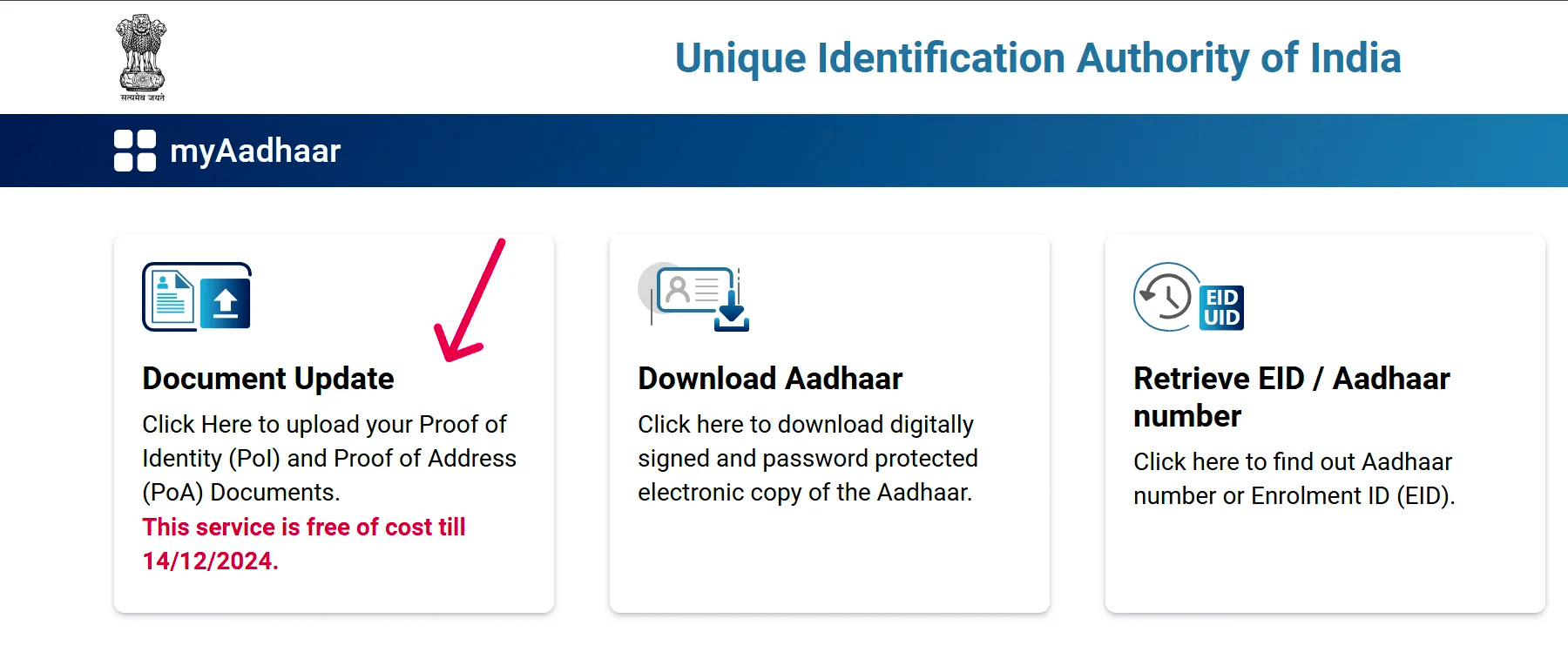
You will be prompted to select the type of identification you wish to use. Choose one of the following options to proceed:
- Aadhaar Number — your 12-digit unique identification number issued by UIDAI
- Virtual ID (VID) — a 16-digit temporary, revocable number linked to your Aadhaar
- Enrolment ID (EID) — the 28-digit number found on your Aadhaar enrolment slip
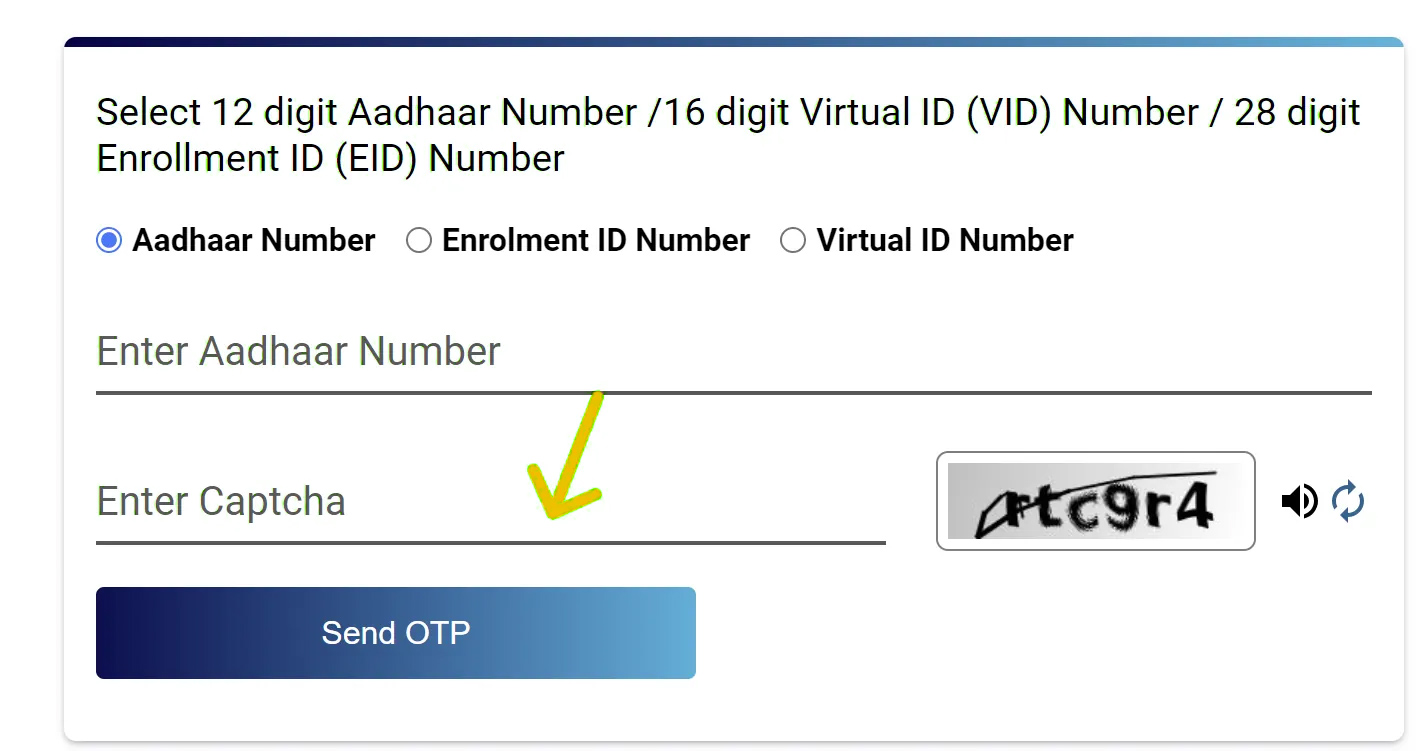
Enter the selected ID number carefully in the provided field. Double-check for any typing errors before proceeding to the next step.
Enter the security CAPTCHA code displayed on the screen. This step verifies that you are a real user and helps protect your personal information.
Click on the Send OTP button. A One-Time Password will be sent to the mobile number that is registered and linked with your Aadhaar account.
Retrieve the OTP from your registered mobile number and enter it in the designated field on the portal. OTPs are time-sensitive, so make sure to enter it promptly within the validity window.
After successful OTP verification, you may be asked to select the type of Aadhaar you wish to download — regular e-Aadhaar or a masked version that hides the first eight digits of your Aadhaar number for added privacy. Select your preferred option.
Click the Download button. Your e-Aadhaar will be downloaded as a password-protected PDF file to your device. The password to open the PDF is a combination of the first four letters of your name in uppercase followed by your birth year (e.g., RAJE1990).
If your mobile number is not linked with your Aadhaar, you will have to visit the nearest Aadhaar Seva Kendra to update it. Without a registered mobile number, the OTP-based download process cannot be completed online, and an in-person visit remains the only available option to update your details or obtain a physical copy.
If you forget Aadhaar or Enrolment ID number, you can Retrieve EID/Aadhaar number by entering your name or mobile or email which retrieves your information through an OTP.
2. Through mAadhaar Mobile Application
- Install the mAadhaar app on your smartphone from the official app store.
- Open the app and complete registration using your registered mobile number with OTP verification.
- After login, go to the dashboard and select the “Download Aadhaar” option.
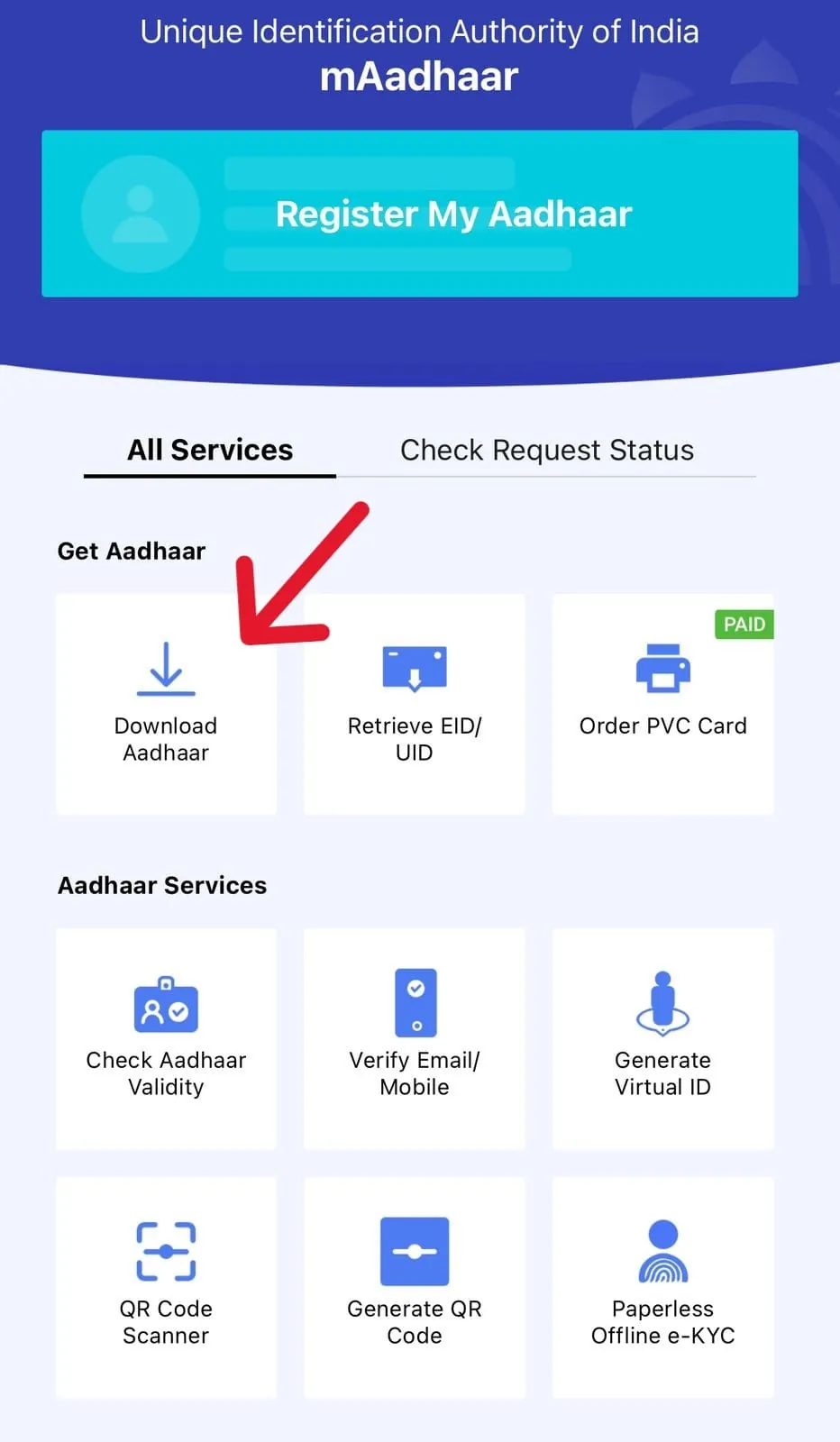
- Choose Aadhaar type as per your need: Regular Aadhaar or Masked Aadhaar.
- Regular Aadhaar shows the full Aadhaar number, while Masked Aadhaar hides the first 8 digits.
- Enter your Aadhaar Number, Virtual ID (VID), or Enrolment ID (EID) along with the captcha code.
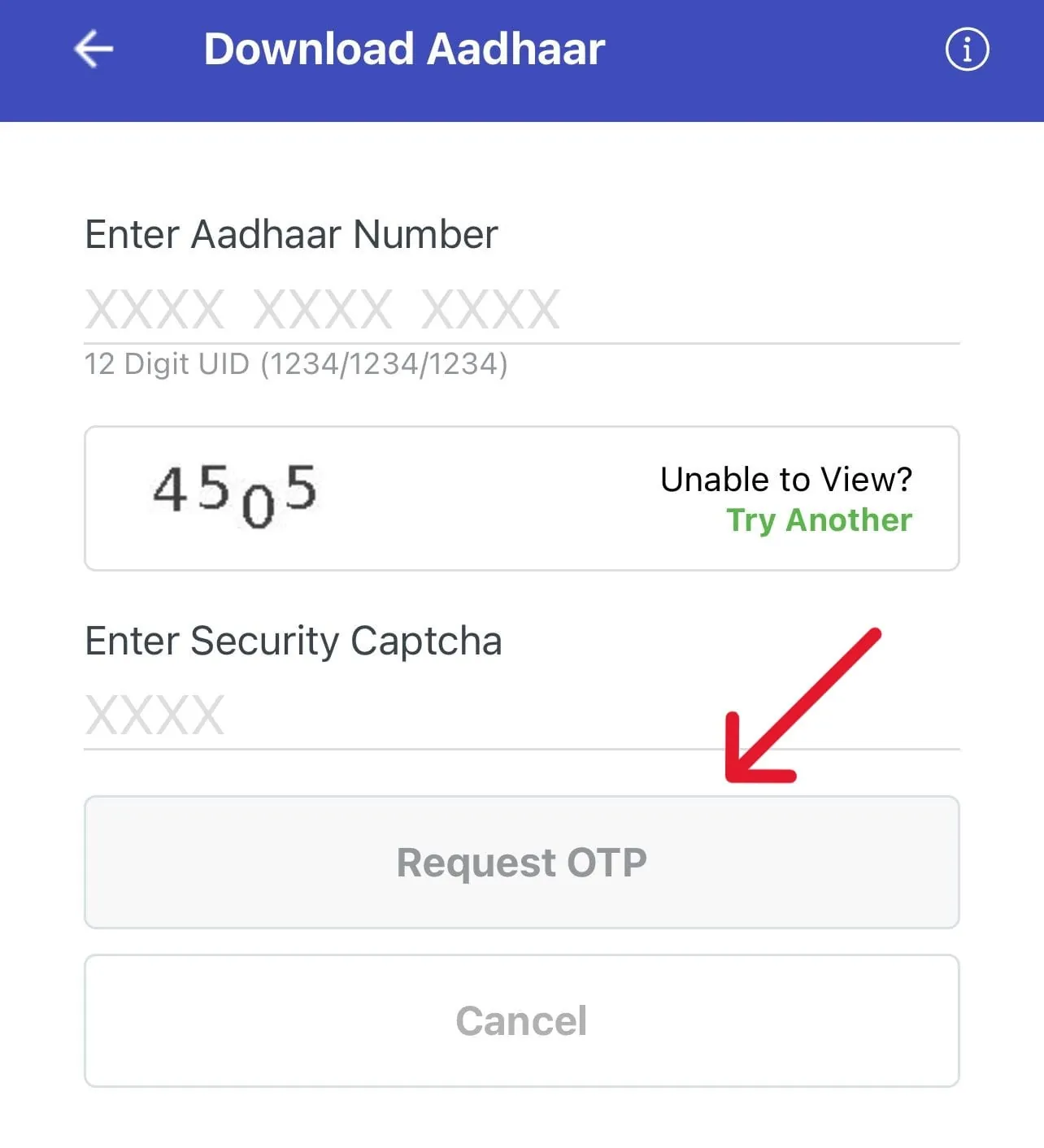
- Click on the “Request OTP” button and enter the OTP received on your registered mobile number.
- After successful verification, select the download option to get your Aadhaar card in PDF format.
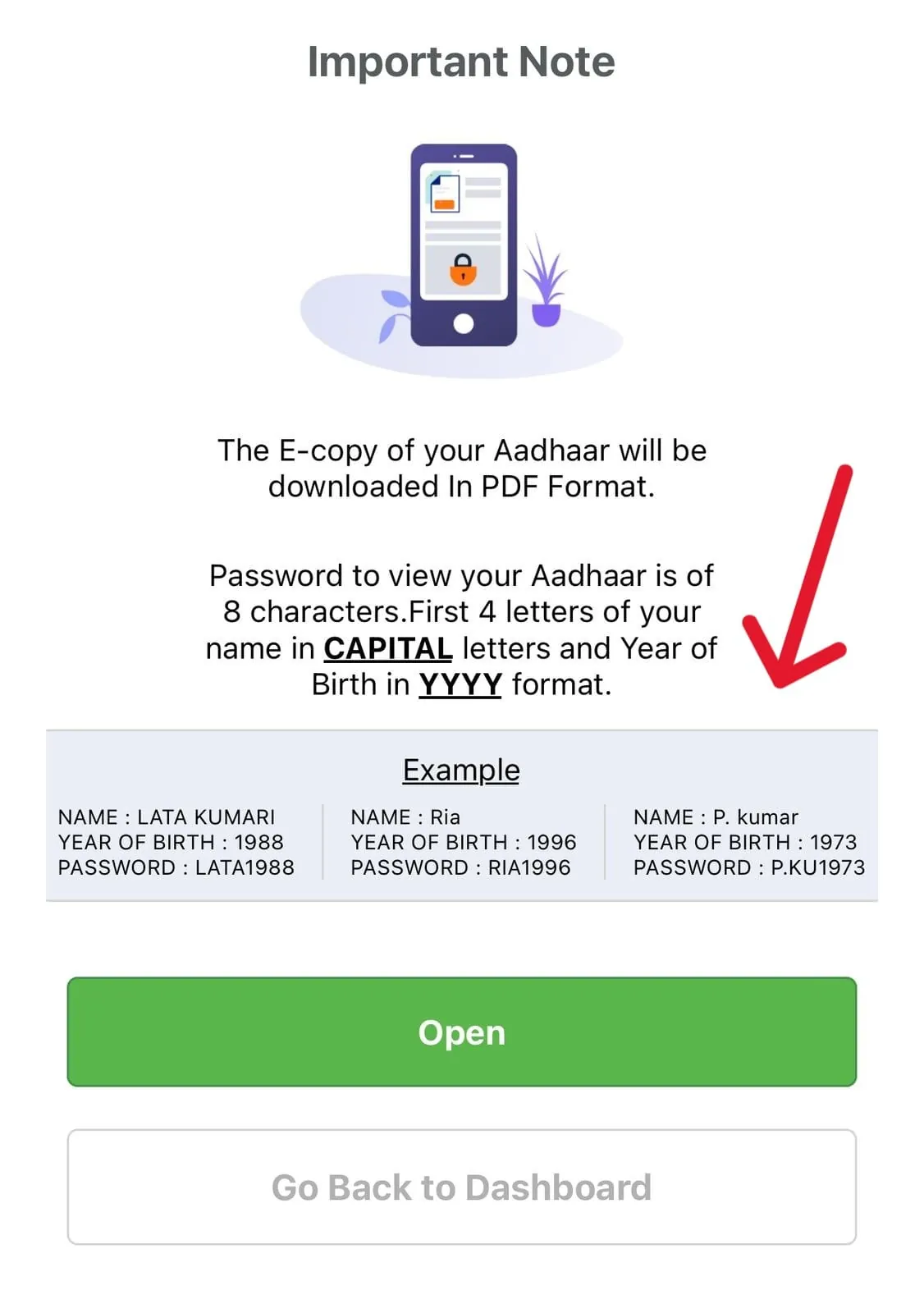
The e-copy of your Aadhaar is downloaded in PDF format on your mobile or device. This digital version is valid everywhere and can be used just like a physical Aadhaar card.
The mAadhaar app is an official application developed by the Unique Identification Authority of India. It allows users to access and store their Aadhaar securely on their mobile and use it whenever required without carrying a physical copy.
- Download Aadhaar
- Retrieve EID / VID
- Order PVC Card
- Check Aadhaar Validity
- Verify Email / Mobile Number
- Generate Virtual ID (VID)
- Check Aadhaar Status
- Track PVC Card Request Status
- Check Aadhaar Order Status
3. Download Aadhaar through DigiLocker
DigiLocker is a secure platform that allows you to access and download your Aadhaar online without carrying a physical copy. You can safely store and use your Aadhaar anytime.
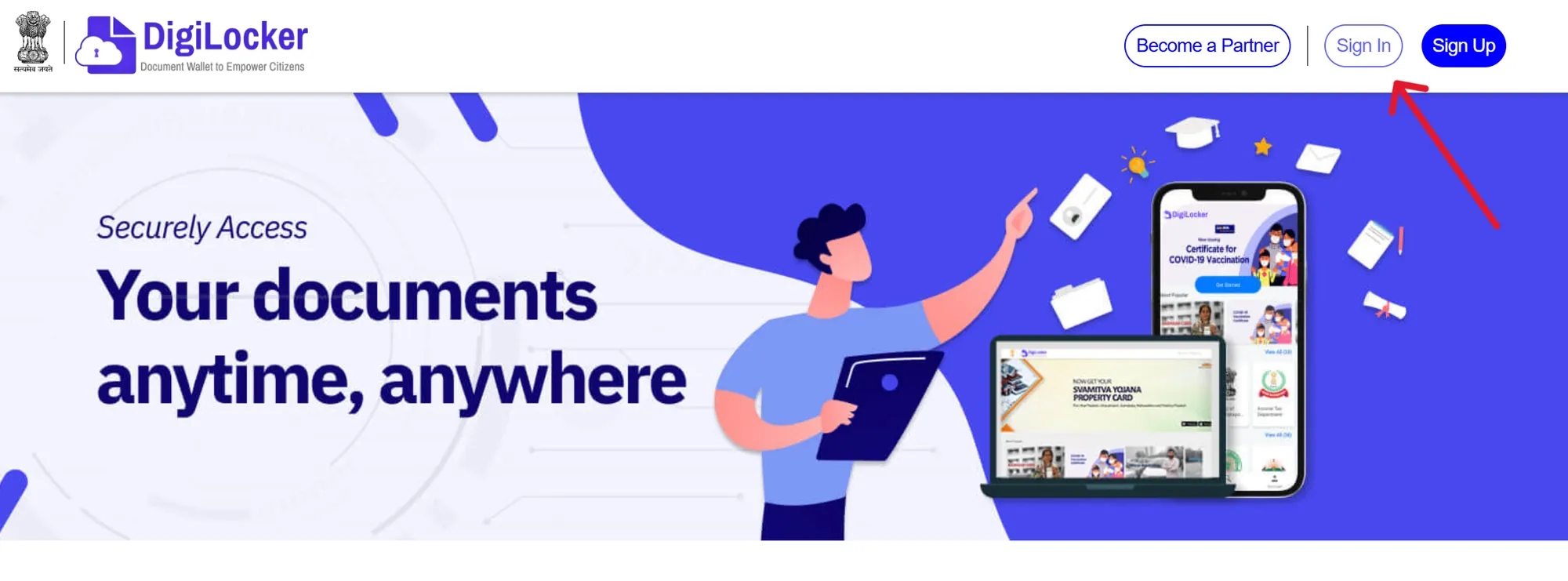
- Step 1: Log in to DigiLocker
- Open the DigiLocker website or mobile app.
- Sign in using your mobile number, Aadhaar number, or username.
- Enter the OTP received on your registered mobile number to continue.
 Note:
Note:If you do not have an account, create a new one using your mobile number and email linked with your Aadhaar.
- Step 2: Find Aadhaar Services
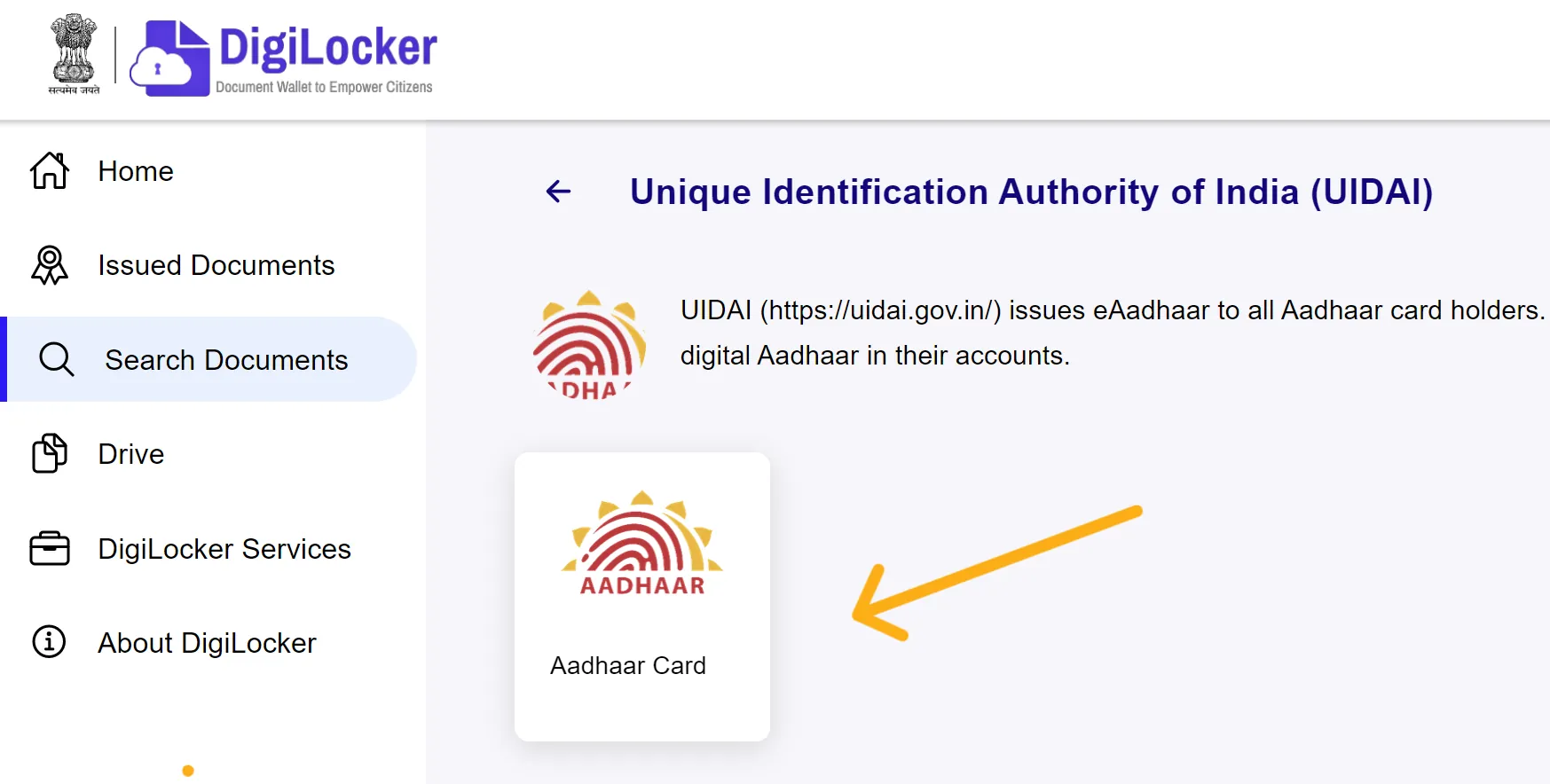
- After logging in, go to the “Search Document” section.
- Type “Aadhaar” and search for your Aadhaar card.
- From the results, click on the Aadhaar card option shown on the screen.
- Step 3: Provide Aadhaar Details
- Enter your Aadhaar number in the required field.
- Complete the OTP verification process.
- Step 4: Download Aadhaar
- Go to the “Issued Documents” section.
- Click on the download icon next to your Aadhaar.
- Save the file in PDF format on your device.
- You can also view your Aadhaar anytime inside DigiLocker.
4. Download Aadhaar through UMANG Portal
UMANG is a government app and website that provides many online services, including Aadhaar services. You can use it to download your Aadhaar easily on your mobile or computer.
- Step 1: Log in to UMANG Portal
- Open your browser and go to the official UMANG website.
- If you are a new user:
- Register using your mobile number or email ID.
- Create a strong password for your account.
- Verify your details using the OTP sent to your mobile or email.
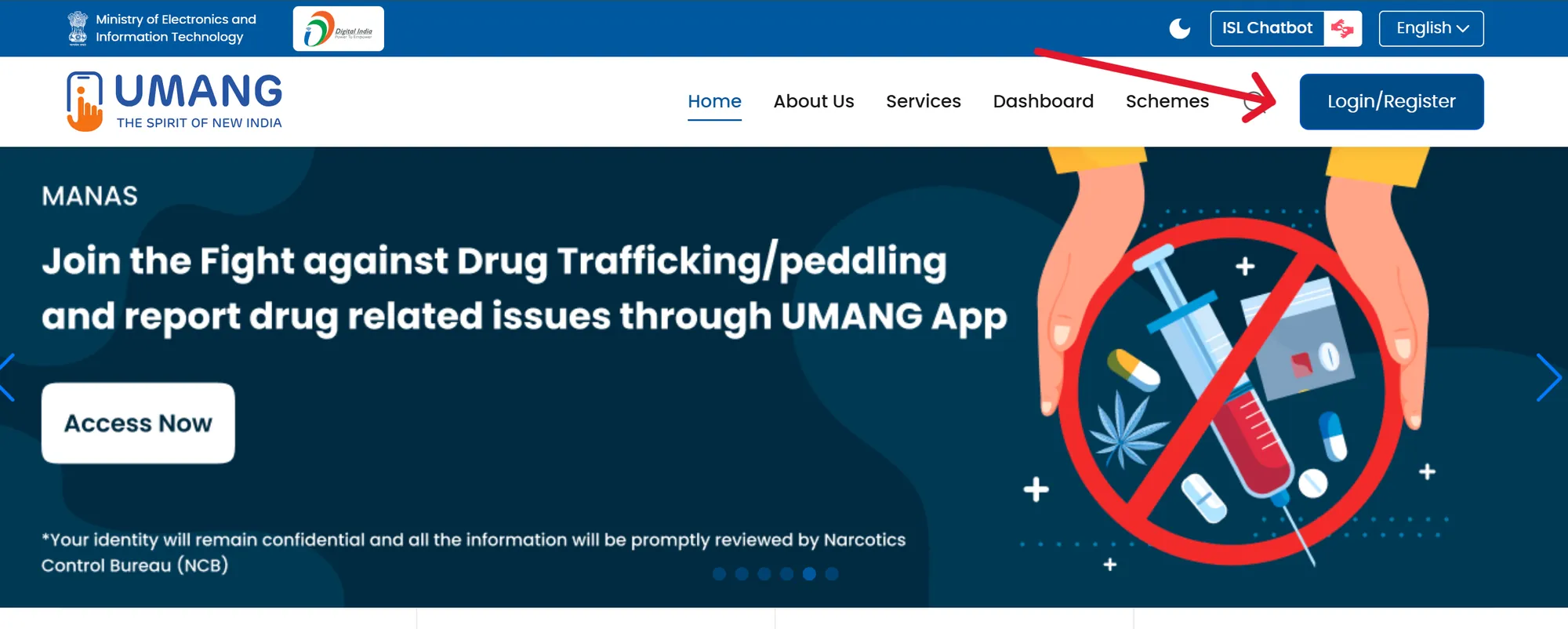
- If you already have an account:
- Simply log in using your mobile number, email ID, or username.
- Step 2: Open My Aadhaar Section
- After login, you will see the dashboard.
- Find the Aadhaar services section.
- Click on “My Aadhaar” to continue.
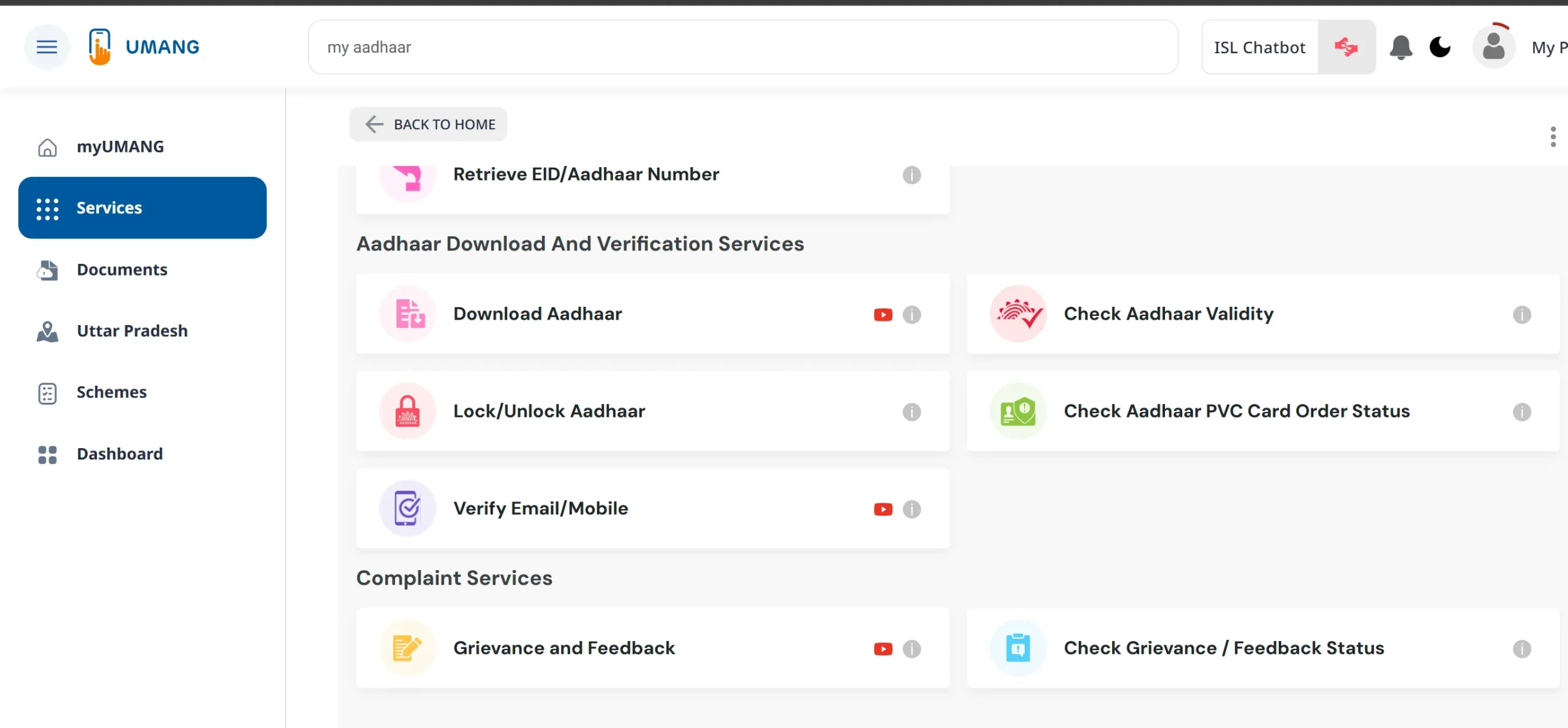
- Step 3: Choose Download Aadhaar
- Inside the Aadhaar section, multiple services will appear.
- Look for the “Download Aadhaar” option.
- Click on it to proceed.
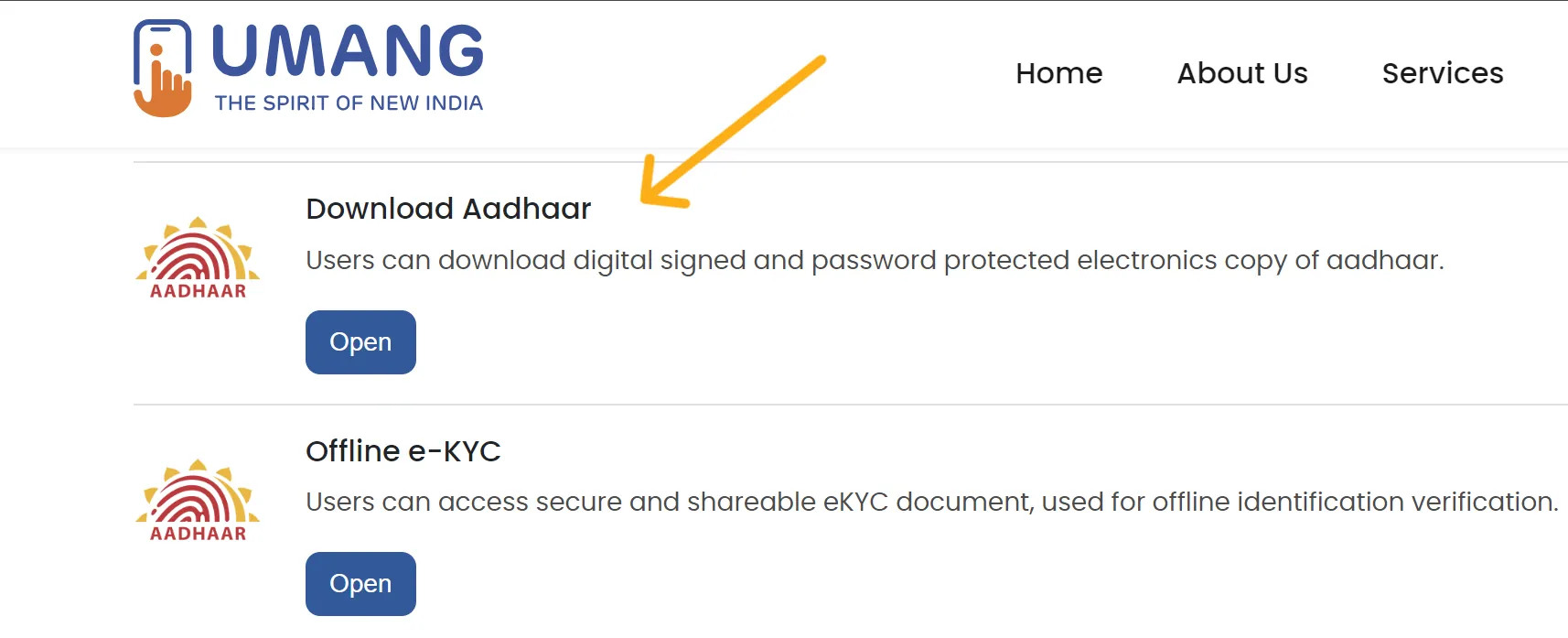
- Step 4: Start Verification
- A new page will open for verification.
- Click on the “Proceed” or similar button to continue.
- Step 5: Enter Details and OTP
- Enter your Aadhaar number or Virtual ID (VID).
- Make sure the details are correct.
- Click on “Send OTP”.
- Enter the OTP received on your registered mobile number.
- Step 6: Download Aadhaar
- After successful verification, click on “Verify & Download”.
- Your Aadhaar will be downloaded in PDF format.
- Open the file using the correct password:
- First 4 letters of your name (in CAPITAL) + Year of Birth (YYYY)
E-Aadhaar Password
The e-Aadhaar file is downloaded in PDF format and is protected with a password to keep your information safe. You need to enter this password every time you open the file.
This password is automatically created using your personal details. It is simple and follows a fixed format, so you do not need to create it manually.
Below are some examples to help you understand the password format:
| Name | Year of Birth | Password |
|---|---|---|
| Rakesh Kumar | 1992 | RAKE1992 |
| Sunita Sharma | 1987 | SUNI1987 |
| Mohan Verma | 1995 | MOHA1995 |
| Anita Singh | 2001 | ANIT2001 |
| Deepak Yadav | 1998 | DEEP1998 |
The password to open your Aadhaar PDF is made using the first four letters of your name (in CAPITAL) and your year of birth (YYYY).
The Aadhaar PDF password system was changed around the beginning of 2019. Before that, the password was based on your area PIN code.
After 2019, UIDAI introduced a new and simple password rule. Now, the password is made using the first 4 letters of your name in CAPITAL and your birth year (YYYY).
This change was done to make the system safer and easier for everyone. The exact date was not clearly announced, but most people noticed this change around 2019.
The new password format is easy to remember and helps keep your Aadhaar details more secure.
What is Aadhaar Card?
Aadhaar Card is a unique identity document issued by UIDAI to residents of India. It contains a 12-digit number that is used to confirm a person’s identity and address.
UIDAI started this system in 2009, and since then, Aadhaar has become one of the most widely used identity documents in India.
Each person gets a unique Aadhaar number, which acts as a digital identity. This identity can be verified using biometric details like fingerprints and eye scan, or through an OTP sent to the registered mobile number.
What is e-Aadhaar?
e-Aadhaar is the digital (online) version of your Aadhaar card. It is issued by UIDAI and comes with a secure digital signature.
This digital signature makes the e-Aadhaar safe and trusted. It contains all your details such as your Aadhaar number, name, photo, and other basic information.
e-Aadhaar is equally valid as the physical Aadhaar card. You can download it from the official UIDAI website or access it through the mAadhaar app anytime.
- Digital Format: e-Aadhaar is available in digital form, so you can easily use it on your mobile or computer anytime.
- Password Protected: The PDF file is secured with a password to keep your personal information safe.
- Legally Valid: e-Aadhaar is fully valid and can be used the same as a physical Aadhaar card.
- Masked Aadhaar Option: You can choose a masked version where the first 8 digits of your Aadhaar number are hidden.
e-Aadhaar can be used for identity verification and for accessing various government and official services, just like the physical Aadhaar card.
Uses of Aadhaar Card
Aadhaar card is used for many purposes in daily life. It helps in identity verification and accessing different services easily.
| Use | Details |
|---|---|
| Identity and Address Proof | Aadhaar can be used as proof of identity and address for many government and private services. |
| Subsidies and Benefits | It is used for receiving government benefits like LPG subsidy, pension, and other schemes. |
| Bank Account Opening | Aadhaar is used for KYC verification while opening a bank account. |
| Income Tax Filing | It is required to link with PAN for filing income tax returns. |
| SIM Card Activation | Aadhaar helps in quick verification for getting a new mobile SIM card. |
| Government Services | It is needed to access various government schemes and services. |
| Pension and PF Services | Aadhaar is used for receiving pension and provident fund benefits. |
| Digital Services | It helps in accessing online services and digital platforms securely. |
| Aadhaar-based Payments | It allows secure payments using biometric verification through AEPS. |
| Voter ID Linking | Aadhaar can be linked with voter ID to avoid duplicate records and improve accuracy. |
Frequently Asked Questions
For any issue or question related to Aadhaar, you can visit your nearest Aadhaar service center or contact through the details below:
- Helpline Number: 1947
- Email: help@uidai.gov.in